Slim v2: the redesign
A new design system in light and dark, a modern toolchain, and a viewer rebuilt around hooks and tested pure functions. Existing viewer behavior is kept.
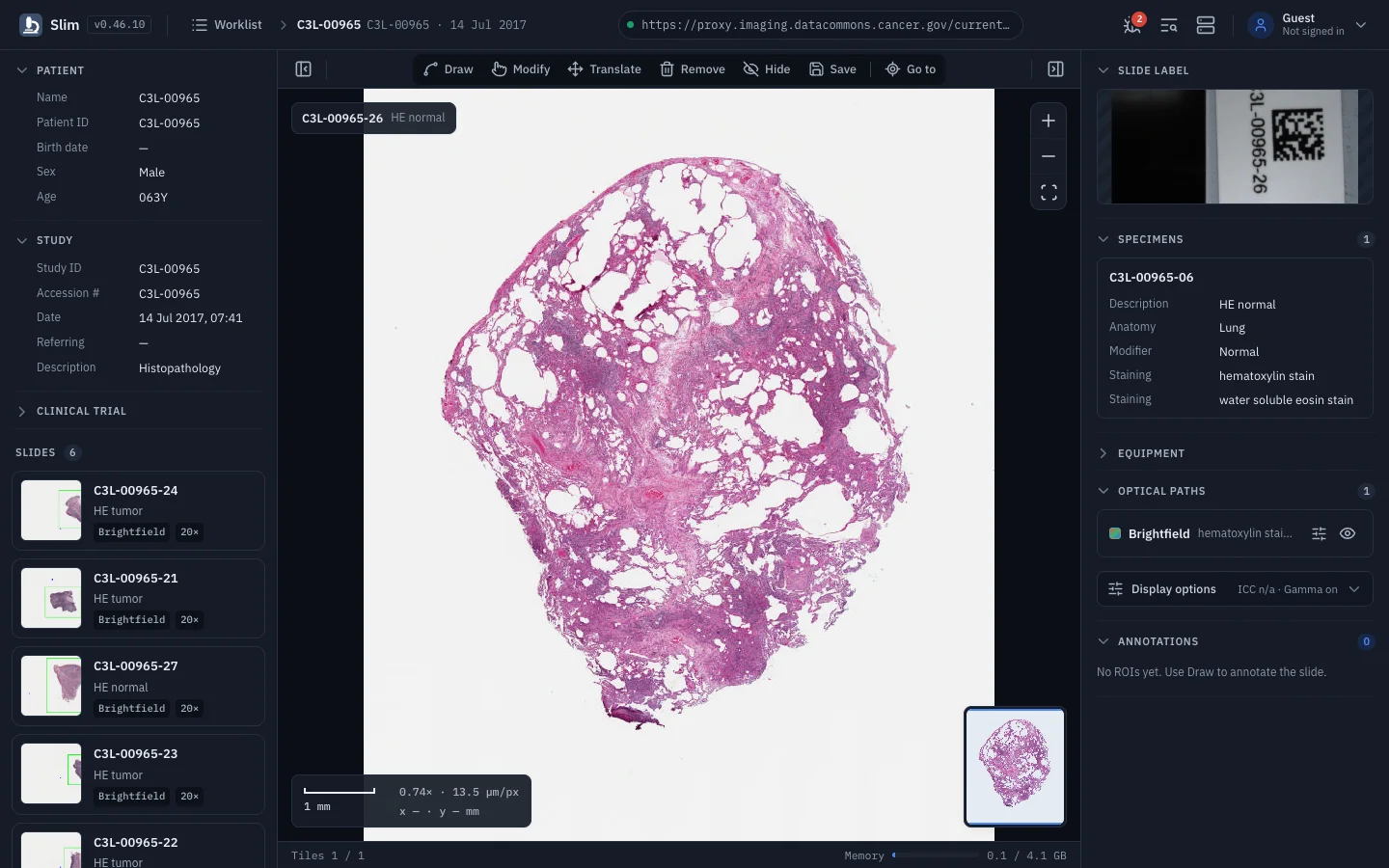
Slim v2 replaces Ant Design with the Slim v2 design system and updates the whole toolchain in the same pass. Everything the viewer could do before still works, and dark mode is now the default.
A new interface
App shell. The header holds the logo, a study breadcrumb, the server pill, and the debug, DICOM tag browser, server and user menus. The theme follows your choice or the operating system.
Worklist. Search, sortable columns, pagination and compact rows. The new Contains filter finds studies holding bulk annotations, 3D SR, segmentations, label maps, parametric maps or presentation states.
Viewer. Collapsible left and right panels, a centered tool pill (Draw, Modify, Translate, Remove, Hide, Save, Go to) that compacts under 720px, overlays for the slide chip, zoom, scale bar, magnification and cursor position, an overview card, and a footer with tile progress and memory use.
Panels. The left panel shows patient, study and clinical trial details and slide cards with thumbnails. The right panel covers slide label, specimens, equipment, optical paths, presentation states, annotations, annotation groups and categories, segmentations and parametric maps. The old settings drawer is gone: ICC, gamma and interpolation toggles now sit under Display options in the section they affect.
Dialogs. Preferences, Debug, Server, Tag browser and every viewer dialog share one header and footer.
A modern toolchain
| Area | Before | Slim v2 |
|---|---|---|
| Build | Create React App, craco | Vite 8 |
| UI | Ant Design 4, Less | Tailwind CSS 4, Radix primitives, lucide icons |
| React | 18, class components | 19.3 with the React Compiler |
| Tests | Jest | Vitest with Testing Library, 1,300+ tests |
| Lint and format | ESLint | Biome |
| Auth | oidc-client | oidc-client-ts |
The UI primitives follow the same shadcn, Radix and Tailwind approach as OHIF’s ui-next, so the two viewers can share components over time.
Under the hood
AppandSlideViewerare function components. Viewer state lives in hooks and the dicom-microscopy-viewer wiring in services.- DICOM parsing, formatting, filtering and viewer math are pure modules with unit tests.
- The implicit OIDC flow, which oidc-client-ts dropped, has its own module that validates
state,nonce,at_hash, audience, issuer and expiry.
Fixes along the way
- Annotation group measurement codes containing a hyphen (LOINC) are no longer truncated.
- Annotation dialog fields stay in sync after reopening, and evaluations can be cleared.
- Preferences apply immediately, and stroke style and confirm-before-remove reach the viewer.
- Tile counts only include the active slide, and failed tiles are counted separately.
- The cursor readout shows slide coordinates in millimeters.
Read the full description in pull request #451.